


 info@codemotives.com
 +91 8511 545 911


Table of Contents
- Introduction: The Web Just Got a Second Audience
- What Is Agentic Browsing, Exactly?
- Why Did Google Add This?
- Three Pillars of the Agentic Browsing Score
- How Agentic Browsing Connects to Codemotives’ Perfect Score
- Real-World Use Cases
- Benefits of Optimising for Agentic Browsing
- Challenges in Achieving Agentic Readiness
- How to Optimise Your Website for Agentic Browsing
- Agentic Browsing vs Traditional SEO
- Where Agentic Browsing Is Heading
Introduction: The Web Just Got a Second Audience
For almost three decades, websites were built for one type of visitor, human beings with eyes, fingers, and patience. You clicked links. You read content. You decided what to do next.
That equation quietly changed in 2026.
Today, when someone asks their AI assistant to “book me a hotel in Goa for next weekend” or “compare pricing plans for cloud hosting,” an autonomous AI agent may visit your website on their behalf, reading your content, clicking buttons, filling forms, and completing transactions. No human involvement. No human eyes on the page.
Google noticed. And in May 2026, they responded by adding a brand-new category to their Lighthouse auditing tool (which powers PageSpeed Insights): Agentic Browsing.
If you run a website, whether it’s a portfolio, SaaS product, e-commerce store, or agency, this new score now sits right next to your Performance, Accessibility, Best Practices, and SEO scores every time someone audits your site. It asks a question none of those other categories ever asked before:
Can an AI agent actually use your website?
This article breaks down everything, from what Agentic Browsing is and how it works, to how to score a perfect 3/3 and why this matters more than most people realise right now.
What Is Agentic Browsing, Exactly?
Agentic Browsing is the ability of an AI agent, a software program acting on a user’s behalf, to independently discover, understand, navigate, and interact with a website without any human guiding it in real time.
The word “agentic” comes from “agent”, an AI system that doesn’t just answer questions but actually takes actions. Think of the difference between asking someone “what restaurants are open nearby?” versus giving them your phone and saying “book me a table for two at the best-rated one.”
The first is a question. The second is agentic: the AI is doing the task, end-to-end.
Google slipped the Agentic Browsing category into Lighthouse 13.3 (released on 7 May 2026), which moved it into the default configuration. PageSpeed Insights inherited it within a couple of weeks, meaning by mid-2026, the category was running on every single report, whether website owners knew about it or not.
Unlike Performance, Accessibility, and SEO, which score your website for human visitors using assistive technology or slow connections, Agentic Browsing scores something entirely different: how ready your page is for software to read it, understand it, and act on it without a human driving.
And here’s the thing that makes this different from previous scores: Agentic Browsing doesn’t produce a weighted 0–100 score. Because the standards for the agentic web are still emerging, Google’s own documentation explains that the current focus is to gather data and provide actionable signals rather than a definitive ranking. Instead of a percentage, you get a ratio, like 3/3, showing how many of the applicable checks your site passes.
Why Did Google Add This? (The Big Picture)
To understand why this matters, you have to understand how people are beginning to use the internet differently.
Five years ago, if you wanted to find the best laptop under ₹60,000, you’d open Google, visit ten websites, compare specs, read reviews, and eventually make a decision. That’s how search worked, you, the human, doing the browsing.
Today, millions of people are asking AI tools like ChatGPT, Gemini, Perplexity, and Claude the same question. The AI searches the web, reads multiple pages, summarises the options, and gives you an answer.
But that’s still passive. The AI is just reading and summarising. The next step, happening right now in 2026, is agentic AI, where the AI doesn’t just read, it acts. It can compare, book, buy, fill forms, and complete workflows on your behalf.
People increasingly ask an assistant a question instead of opening ten tabs. Those assistants are starting to do more than summarise. They browse, navigate, and act. Your site now has two kinds of visitor with different needs, and only one of them has eyes.
In 2026, autonomous AI agents such as Perplexity, SearchGPT, and localised smart assistants are scanning the web, filling out forms, and making purchasing decisions. Preparing your website for agentic access is quickly becoming the ultimate step in modern Generative Engine Optimisation (GEO).
Google adding Agentic Browsing to PageSpeed Insights isn’t a gimmick. It’s Google telling the entire web development industry: this is where things are going, and you should start preparing now.
The Three Pillars of the Agentic Browsing Score
Your Agentic Browsing result in PageSpeed Insights shows a ratio, currently 3/3 at best. Each number represents one check your site either passes or fails. Here’s what each check actually looks at:
1. The Accessibility Tree: Can an AI Agent “Read” Your Page?
This is the foundation of everything.
When you load a webpage in your browser, you see colours, images, fonts, and animations. But underneath all that visual presentation sits something called the accessibility tree, a stripped-down, machine-readable representation of your page’s content and interactive elements.
Screen readers for visually impaired users rely on this same tree. So do AI agents.
The accessibility tree is a simplified representation of the page structure used by accessibility tools and AI agents. AI agents can process the accessibility tree more efficiently compared to the full HTML code or a website screenshot.
An agent doesn’t look at your pretty buttons. It reads the accessibility tree, the same simplified structure a screen reader uses, because that’s the cleanest map of what the page contains and what can be clicked.
What this audit specifically checks:
- Are all interactive elements (buttons, links, form fields) properly named?
- Are ARIA roles and parent-child relationships valid?
- Is any interactive content hidden from the accessibility tree?
- Are headings structured in a logical, hierarchical order?
Real-world impact: Imagine an AI agent trying to book a flight on a travel website. If your “Book Now” button has no accessible name, just an icon with no label, the agent cannot identify that button. It cannot complete the booking. Your website effectively becomes invisible to that AI, even if it loads perfectly for human eyes.
The good news: improving your accessibility tree benefits both AI agents and human users with disabilities. It’s one of the most impactful things you can do for your website.
2. Stable Layout (CLS): Does Your Page Stay Still?
The second check is about stability, specifically, Cumulative Layout Shift (CLS).
CLS measures how much your page visually shifts as it loads. Banner ads that pop in and push content down. Images that load slowly and shunt the text around. Cookie consent banners that appear mid-scroll. All of these cause layout shifts.
For human users, layout shift is annoying. For AI agents, it’s a critical problem.
A low CLS is vital for agents. Since agents interact programmatically by calculating click targets, layout shifts of a few pixels can cause the simulated click to hit the wrong element entirely.
An AI agent may interact with your website more quickly than a human visitor, so shifts that occur as content is loading may be more disruptive to an agent than to a person.
Think of it like this: a human browsing your page sees the layout shift and naturally adjusts, they just click where the button ended up. An AI agent, which calculates the exact pixel coordinates of a click target, may fire its click at the original position. If the button has shifted 40 pixels down, the agent clicks empty space and fails.
Practical fix: Set explicit width and height attributes on all images and videos. Avoid injecting content above existing content after the page loads. Use CSS to reserve space for dynamic elements like ads before they load.
3. llms.txt, Your Website’s AI Welcome Letter
This is the most novel and exciting of the three checks, and the one most website owners know least about.
The third pillar links performance with discovery. Lighthouse checks for the presence of an llms.txt file at the domain root. This file provides LLMs (Large Language Models) with a brief, text-only index of the website’s key pages and resources, bypassing the need for exhaustive crawling.
Think of llms.txt as the equivalent of robots.txt, but instead of telling search engine crawlers what they can and cannot access, it directly introduces your website to AI systems. It’s a plain text file placed at yourdomain.com/llms.txt that tells AI agents:
- What your website is about
- What your key pages are
- What actions are available
- How you want AI systems to interact with your content
The Lighthouse audit checks if the website provides an llms.txt file, and if it does, it checks whether the file is missing an H1 header, is too short, or doesn’t contain any links.
A simple llms.txt for an IT company might look like this:
# Codemotives

> Codemotives is a software development and IT services company based in India, specialising in web development, mobile applications, and digital transformation.

## Key Pages
- [Home](https://codemotives.com/), Overview of services and company values
- [Services](https://codemotives.com/services/), Full list of development and consulting services
- [Case Studies](https://codemotives.com/case-studies/), Real project outcomes for clients
- [Contact](https://codemotives.com/contact/), Get in touch or request a project quote
It’s short, structured, and incredibly powerful. When an AI agent wants to understand your website without crawling every single page, llms.txt hands it a roadmap in seconds.
The Fourth Check: WebMCP (The Future One)
There’s a fourth audit in the category that won’t appear in your 3/3 result, and it’s the most forward-looking. WebMCP is a proposed standard that lets a website declare specific actions an agent can call directly, submit this form, start this booking, add this to a cart. Instead of an agent guessing how to use your interface from a screenshot, you hand it a labelled set of controls.
The WebMCP audit needs Chrome 150 and an origin trial registration to run at all, and it’s weighted low while the standard stabilises. In practice it may fail on nearly every site on the web today, including sites doing everything else right. That’s why it sits outside the default pass ratio. The practical takeaway: don’t lose sleep over WebMCP yet.
But watch this space. WebMCP represents the future where your website doesn’t just passively get read by AI agents, it actively invites them to complete specific tasks with precision. For e-commerce, booking, and SaaS websites, this will eventually be transformational.
How Agentic Browsing Connects to Codemotives’ Perfect Score
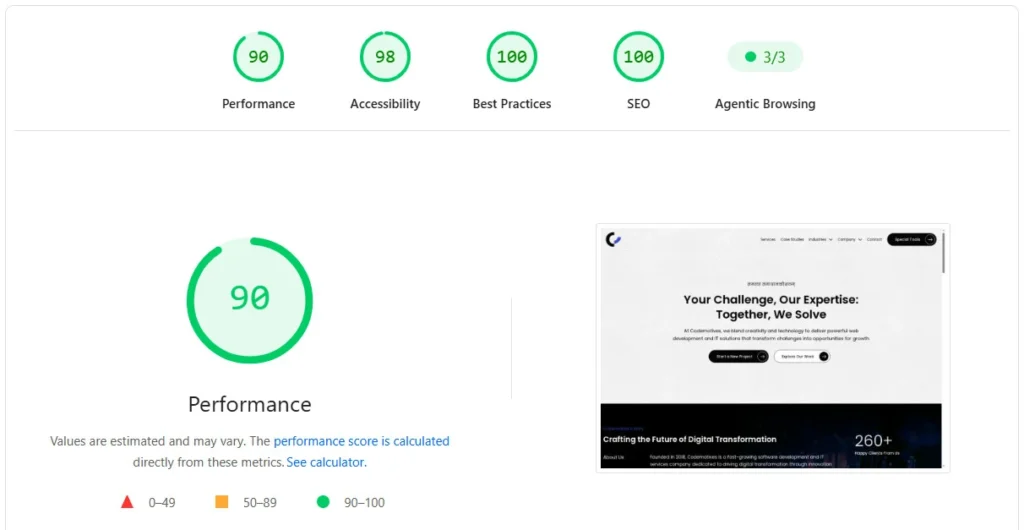
Looking at the PageSpeed Insights screenshots shared, Codemotives’ website currently scores a 3/3 on Agentic Browsing, alongside:
- Performance: 90 (Excellent)
- Accessibility: 98 (Near perfect)
- Best Practices: 100 (Perfect)
- SEO: 100 (Perfect)
That 3/3 Agentic Browsing result isn’t luck. It tells you three things:
- The site’s accessibility tree is well-structured, with properly named interactive elements
- The layout is stable, CLS is at an acceptable level, so AI agents can click targets reliably
- An
llms.txtfile is present and properly formatted at the domain root
For a software development and IT services company like Codemotives, this score is particularly meaningful. It signals to potential clients, and to the AI agents that may be evaluating vendors on their behalf, that the website is built with modern standards, attention to detail, and future-readiness. It’s not just a score. It’s a professional statement.
Real-World Use Cases: What Agentic Browsing Actually Enables
Let’s get grounded in real examples of what becomes possible as AI agents get better at browsing the web.
E-Commerce: AI That Shops For You
A user tells their AI assistant: “Find me a formal shirt in navy blue, under ₹2,500, size medium, from an Indian brand.” The agent browses multiple clothing websites, filters products, reads product descriptions and reviews via the accessibility tree, and presents options, or even places the order directly.
Websites with poor accessibility trees or unstable layouts will be skipped or misread. The agent will surface competitors instead.
Travel & Hospitality: Booking Without the Browser
“Book a 4-star hotel in Pune from 10th to 12th July with free breakfast for two adults.” The agent checks availability, reads pricing, and completes the booking form, all autonomously. If a hotel website’s form fields have no accessible labels, the agent cannot fill them correctly and will move to OTAs (Online Travel Agencies) instead.
B2B Services: AI Vetting Vendors
A procurement manager at a large company says to their AI assistant: “Shortlist three web development agencies in India that specialise in e-commerce, with proven case studies.” The agent visits multiple agency websites, reads case studies via structured content, checks service pages, and compiles a report.
Agencies whose websites are AI-readable will make the shortlist. Those with inaccessible or poorly structured pages will not.
Healthcare: Appointment Booking
“Schedule a general physician consultation at Apollo Hospitals near me for this Saturday morning.” The agent navigates the hospital’s website, finds available slots, fills patient details, and books, provided the site’s accessibility tree and forms are properly structured.
Benefits of Optimising for Agentic Browsing
Beyond the score itself, here’s what you actually gain by making your website AI-agent-ready:
1. Future-Proofing Your Digital Presence
The shift to agentic AI browsing is not hypothetical, it’s happening now, and will accelerate. Optimising today means you’re not scrambling to catch up in two years.
2. Better Accessibility for All Users
Every improvement you make for AI agents, cleaner accessibility trees, stable layouts, semantic HTML, directly benefits human users with disabilities, screen reader users, and keyboard navigators. It’s a genuine win-win.
3. Improved SEO and GEO Simultaneously
The goal has moved from ranking in a list of links to being read, understood, and cited by machines. What is new here is that Google has put a number on part of it, inside the tool your developers already open every week. The difference between SEO and GEO used to be an argument you had to make. Now there is a category in PageSpeed Insights making it for you.
4. Competitive Advantage Right Now
The window before “passing Agentic Browsing” stops being a differentiator and starts being table stakes is closing. Six months from now this audit is normal, expected, and unremarkable. Right now it’s a signal your competitors haven’t shipped against yet.
5. Increased Trust Signals
A website that scores 3/3 on Agentic Browsing alongside strong Performance, Accessibility, and SEO scores projects technical professionalism. For clients evaluating vendors, this matters.
Challenges in Achieving Agentic Readiness
Optimising for Agentic Browsing is not without its challenges. Here’s an honest look at what makes it difficult:
Dynamic JavaScript Frameworks
Websites built heavily on JavaScript (React, Vue, Angular) often render content client-side, which means the accessibility tree may not be fully built when the agent captures a snapshot. Server-side rendering or careful hydration strategies become important.
Legacy CMS Constraints
Many websites on WordPress, Joomla, or older CMS platforms have themes that generate poor HTML structure with missing ARIA roles, unlabelled form elements, and excessive layout shifts from plugin interactions. Retrofitting these requires effort.
Third-Party Scripts
Ads, chat widgets, cookie banners, and analytics scripts often inject content that causes CLS and pollutes the accessibility tree. These are hard to control without careful script management.
llms.txt Maintenance
An llms.txt file that becomes outdated, pointing to removed pages, missing key new sections, is worse than a well-maintained one. It requires ongoing content governance.
WebMCP Complexity
The WebMCP standard is still in origin trial phase. For transactional websites (e-commerce, bookings), implementing WebMCP correctly will require significant development work and staying current with an evolving specification.
How to Optimise Your Website for Agentic Browsing
Here is a practical checklist to get you started:
Accessibility Tree
- Use semantic HTML,
<nav>,<main>,<article>,<button>,<form>,<label> - Add descriptive
aria-labelattributes to all interactive elements that lack visible text - Ensure all images have meaningful
alttext - Check for valid parent-child relationships in ARIA roles
- Test with a screen reader or browser accessibility inspector
Layout Stability (CLS)
- Set explicit
widthandheighton all images, videos, and embeds - Reserve space in CSS for dynamically loaded content
- Load web fonts efficiently with
font-display: swap - Test your CLS score in PageSpeed Insights, aim for below 0.1
llms.txt
- Create a plain text file at
yourdomain.com/llms.txt - Include an H1 heading with your site name
- Write a concise description of what your website does
- Add links to all major sections with brief descriptions
- Keep it updated as your website evolves
Schema Markup
- Schema.org is how an agent decides what kind of page it’s looking at without parsing the human copy. A Product block tells it “you can act on this.” An Article block tells it “you can cite this.” A FAQPage block tells it “extract these question-answer pairs verbatim.”
Sitemap
- A sitemap is the agent’s URL inventory. Without it, the agent walks the homepage navigation and hopes for the best. Ensure your
/sitemap.xmlis valid and referenced from/robots.txt.
Agentic Browsing vs Traditional SEO: What’s the Difference?
| Dimension | Traditional SEO | Agentic Browsing |
|---|---|---|
| Primary audience | Human users via search engines | AI agents acting autonomously |
| Key signals | Keywords, backlinks, page speed | Accessibility tree, CLS, llms.txt |
| Scoring tool | Search Console, Lighthouse SEO | Lighthouse Agentic Browsing |
| Goal | Rank higher in search results | Be usable and actionable by AI |
| Content focus | Keyword-optimised copy | Structured, machine-readable content |
| Interaction model | User clicks from SERP | Agent completes tasks directly |
The important insight: these two goals are not opposed. A website optimised for Agentic Browsing will almost always be a better website for SEO as well, because both care about structure, clarity, semantic HTML, and stable performance.
Future Trends: Where Agentic Browsing Is Heading
1. WebMCP Becomes Standard
As WebMCP matures from an origin trial into a proper web standard, more websites will declare explicit agent-callable actions. This will make AI agents vastly more capable and reliable for completing transactions online.
2. Agentic Browsing Scores May Influence Rankings
Currently, Google says the Agentic Browsing score is not a search ranking factor. But the fact that Google built and shipped this scoring system suggests they are gathering data. History says: what Google measures today, Google ranks on tomorrow.
3. AI Commerce Becomes Mainstream
As more consumers use AI assistants for purchasing decisions, the concept of “AI-led commerce”, where an agent completes a purchase journey end-to-end, will become a real channel that websites need to optimise for, much like mobile optimisation was in 2010.
4. llms.txt Becomes as Standard as robots.txt
Just as every website today has a robots.txt, within a few years, having a well-maintained llms.txt will be a baseline expectation, a fundamental part of any website launch checklist.
5. GEO Replaces Pure SEO in Many Contexts
Generative Engine Optimisation, the practice of making your content the preferred source cited by AI systems like ChatGPT, Gemini, and Perplexity, will absorb traditional SEO into a broader discipline. Agentic Browsing readiness will be one component of GEO.
Key Takeaways
- Agentic Browsing is Google’s new Lighthouse category that measures how well AI agents can read, understand, and interact with your website.
- It was introduced in Lighthouse 13.3 (May 2026) and now appears on every PageSpeed Insights report automatically.
- Unlike other Lighthouse categories, it shows a pass ratio (e.g. 3/3) rather than a 0–100 score.
- The three current checks are: accessibility tree quality, layout stability (CLS), and presence of llms.txt.
- A fourth audit, WebMCP, is experimental and not yet part of the standard 3/3 result.
- Optimising for Agentic Browsing benefits your SEO, accessibility, and competitive positioning simultaneously.
- The window to gain competitive advantage by being an early adopter is open right now, but it won’t stay open long.

